Using LED Tape Lighting To Enhance Your Home Decor

There are a plethora of inventions which can bring out the best of your design and decor around the home. One of the most innovative and user-friendly of these inventions is LED tape lighting. Here are some ideas to help you get started using this great innovation in your house.

led

So What Is LED Tape?

LED tape is the latest incarnation of this incredibly versatile type of light. Reels of strip lighting are available which you are able to cut to exactly the size you need with ordinary scissors, usually every 50mm. You must then solder the strip to the power cable. They are available in a variety of colours and colour changing options and are compatible with dimmers. These tapes are even self-adhesive for ultimate ease of use and practicality. The width and thickness may vary.

Versatility Of Use

You can place LED tape lights almost anywhere in the home and if used effectively, they can be concealed so all you see is the glow from the bulb. Many locations in the home will benefit from the extra light, especially where there is not any natural light available.

Providing a line of brilliant light on any surface, you could use a 12v LED tape light to highlight the entrance to a shop, restaurant or pub, to provide extra illumination under kitchen or bathroom cabinets, or to provide uplighting for displays or notice board areas. As they are self-adhesive, you will never have to worry about hammering nails to mount these lights.

Low Cost Of Operation

LED bulbs are extremely energy efficient. They convert nearly 80% of the energy they use into light. This means that they are cost effective and could even save on your energy bills. As they are not wasteful with the energy used, they are also eco-friendly and therefore kind to the environment.

Safety

As a by-product of this energy efficiency, LEDs are always cool to the touch. This means young children and the elderly are unable to burn themselves on hot light bulbs. Conventional bulbs are perfectly safe to use, but LEDs offer you an added extra degree of safety.

Wide Choice Of Colors

You have access to a wide variety of color choices when using LED tape lights. Dictate the mood of a room by choosing a palette to match your mood. Yellows and oranges will create a warm, summery feeling whilst clear white and blue tones promote a more modern, up-to-date profile. You have full control over the light level utilizing dimmer switches and and remote controls, completely changing the feel of a room at the touch of a button.

Use In Study Areas

LED lighting is capable of providing a clear and intense light suitable for studying, reading or drawing. This type of intense illumination is perfect for picking up on the accurate details in your studies. Easily mounted to any surface, you will find LED tape lighting is an easy solution to brighten up the most dingy and cluttered of work spaces.

Around The Home

Whilst the uses for LED tape lighting are only limited by your imagination, here are some of the most common applications, for example: in your bedroom, you can conceal LED tape lights underneath the beds, wardrobes or tables. You could try mounting tape lights around the edges of drawers and cabinets in the kitchen, for greater visibility when using sharp implements for chopping and cutting. This type of lighting is also ideal for use in a bar or games room type scenario.

Author Bio:

James Holden is the digital content manager of Visible Lighting and has many years’ experience in the LED Lighting industry. To find out more information on James Holden, you can follow him on Google Plus.


Steps to Get Your Google Plus Custom URL

I have had a custom Google URL Profile page for along time and my profile is http://plus.google.com/+JustinGermino but I have been waiting for a long time for the Google Plus custom URL of +DragonBlogger to be offered for my Google Plus Business page but so far nothing has come yet.

Tuan Do from TechWalls wrote up a few really good articles about Google Plus, the first being how to get your custom Google Plus Profile URL.

http://www.techwalls.com/set-custom-url-google-plus-profile/

Tuan wrote a 2nd on what you need to do to get your Google Plus Business page ready for a custom vanity URL, but after doing all of the steps, remember that you are at the mercy of waiting for Google to offer it to you. You can find the steps here.

http://www.techwalls.com/set-custom-url-google-plus-page/

But I have the site linked, verified and the badge for over 7 months now and still haven’t been offered a vanity URL for my Google Plus Business page.

image

This is part of the slowly rolling out Google Direct Connect, where if you search on Google and put a business name with a + before it, you will be taken to the business Google Plus page immediately.  Example would be doing +Walmart and going directly to Walmart Google Plus page presumably which is a nice feature, certainly I want to promote plus.google.com/+DragonBlogger instead of the page number I have now which is https://plus.google.com/b/100382192549813765462

Meanwhile I read another article that Google Plus is growing rapidly and over 500 million Google Plus users are leveraging services, though the actual usage of Google Plus itself is around 350-400 million per month.  Clearly Google isn’t backing away from it’s Google Plus strategy and it’s working as stock prices soared about 1k for the first time in history recently.  Are you vesting enough in Google Plus, let me know your strategies and how they have changed lately.

Finally Hit Level 80 in Guild Wars 2

Gorghost finally made level 80 last week and I spent all my Karma equipping him with level 3 cultural weapons.

image

Still don’t have level 80 gear and nothing like Legendary or Ascended items, but will be working on that after I finish the single player story campaign.  I also really like the Halloween events and had a great time playing in the PVP villager vs. lunatic combats which give you some great reward for playing and are a fun an unique challenge.

I have yet to see the villager side ever win once, the lunatics always slaughter the villagers from my experience.

Next goal is the 3,000 achievement point goal, meanwhile my 10 year old recently dove into World of Warcraft again and has taken a break from Guild Wars 2 for that classic monument of a game. I was curious to try Final Fantasy XIV at some point, I have heard good reviews about it too.

Incentivibe Continues to Prove a Good ROI

In the 3rd week of September I started testing the Incentivibe platform which allows you to run sweepstakes on your blog, where for $25 per month you get to offer $500 value prizes because you are sharing the prize cost with other hosts in the platform, so the consolidated hosts all have their own choice of prize and about 20-30 hosts combine to offer a fantastic prize.  The prizes include a $500 Paypal gift card (a fan favorite) or $500 Amazon gift card or an iPad Mini and more, new prizes will be added soon.

I did an extensive review of Incentivibe on DragonBlogger read it here and want to follow up after now being in the platform for more than a month.

image

In about 1 month my first $25 got me over 3,059 email leads added to my newsletter, in 1 month I got 951 Twitter followers, 505 Facebook likes, 1357 retweets and 1642 Facebook shares. This means that my $25 investment had a better return than any other platform I have ever tried, including running direct giveaways myself.

I originally thought readers would be annoyed by the pop-ups but I got 0 complains and so many readers and fans thanked us for giving them the chance.  The only thing that isn’t a huge plus for Incentivibe is because there are so many co-hosts for each giant prize that the odds are really low for any one person entering, lower than a traditional single host giveaway, but a chance is a chance and the host is paying $25 per month to be able to offer that chance for a reader or fan to enter and win a fantastic prize which is a great thing.

Incentivibe rocks, and I just love the platform.  As I see it grow and evolve I can’t wait to see more features added to the product, these features include:

  • Better reporting and analytics, being able to run custom date range reports, instead of only seeing lifetime totals and last 2 weeks email collection.
  • Customized Prizes, being able to offer hosts the ability to set a custom $500 prize pack of their choice, instead of one of the platform defaults.
  • Removing individual giveaway code from specific posts, if you do sponsored posts you want to remove any sort of ad or competing product, so I don’t necessarily want Incentivibe to popup on my other giveaway post at the same time if it was a sponsored one, this interrupts and takes spotlight off an advertiser or partner.
  • Multi-site support, being able to have different plans or options for having the same Incentivibe account be hosted on several sites or move it back and forth between sites without having to have a separate Incentivibe account for each site.

Tips on How to Get Rid of Bad Typing Habits

Doing away with your bad typing habit is probably the hardest thing to do. This is because you’ve probably been using the same typing method ever since you started using the keyboard. However, bad typing habits have impact on our lives in one way or another. It could be at the workplace or at school but the truth is you need to break the habit to succeed in fast typing. With a proper typing service you can get rid of bad typing habits just in 2-3 weeks.

Here are few tips on how to get rid of bad typing habits

1. Assess your typing skills

First, you need to check your current typing skills in order to monitor your typing techniques and see how they affect your overall typing efficiency.

2. Finger placement

Most people type with two fingers which is a very bad typing habit. In order to succeed you need to relearn your finger placement on the keyboard. Use your 10 fingers. Ideally, your index fingers should rest on F and J. Once you place them there, the rest fingers will fall naturally into their required keys.

3. Don’t look at the keyboard

Try to use your muscle memory when typing rather than looking at the keyboard. This might take time but eventually you will succeed.


4. Practice with apps

Typing shouldn’t be stressful, once you learn the right techniques you can practice with numerous typing games offered by various websites.

5 online typing services to help you get rid of bad typing habits


1. TypingWeb.com

image

It offers comprehensive typing service to get you using the right hand positioning technique. With it you will be able to do away with bad typing techniques by learning where and how to move your fingers. As you proceed with the training you will benefit from more tutorials and practice sessions that utilize as combination of numbers, letters and symbols to get your fingers flying awesomely over the keyboard.


2. Ratatype.com

image

This tutor offers awesome typing service to help improve your typing skills. You will be trained on proper finger placement and other keyboarding skills. There is a free typing test at Ratatype to evaluate your skills and determine areas that need improvement. To practice the newly acquired skills, you will get numerous typing lessons to keep your skills growing.


3. TypingTest.com

image

Here, you get free online typing tests and the best part is that you don’t have to download or install any software. Once you know your weaknesses, the tutorial works to ensure you get the necessary help to improve your typing skills. Typing games are available to hone your typing skills.

4. Typeracer.com

image

You will learn how to master the home row keys and type without having to look at the keyboard. It has the best typing tests to assess your skills, both good and bad together with speed and accuracy. You can practice using type race with other online gamers and can be linked to social networking sites.

5. 10fastfingers.com

image

Here, you will do away with bad typing technique in a very amazing way. You will learn to use all your 10 fingers following step by step. Not only will you be able to take excellent typing tests but you will also try numerous typing games to make you more proficient in typing.

With these online typing services, you will surely become a touch typing master.

About the author

Adam Fort is an AU Education Science Center advisor and education activist. His goal is to spread the knowledge about touch typing around the globe.

The Tricky Gotchas in a WordPress Theme

It is something that I didn’t initially consider when I was contemplating a new web design for DragonBlogger.com and selecting a WordPress theme that matched the visual appeal and functionality I was looking for.

But when a recent website SEO review tool flagged me as having too many internal links from homepage, I sought to figure out why there were so many links and what was causing hundreds of internal links just from the homepage.

image

So after realizing what my theme was doing, I then figured out I had a challenge to solve to try and reduce those links.

image

So not only does my menu bar links pass links, but I found that in each of my article summaries I was getting a link from the calendar, 2 links with the Full Story and … link, a link for the author, link for the full URL and link for the comments.  This means when I had 12 stories on homepage, it was 70 links just to have 14 summary stories.  Which is far to many, I went to my theme options and trimmed out links for as much as the theme would allow.

I really wish it defaulted to NoFollow most of the links except for just the one Full Story link, but that isn’t functionality built into the Suffusion framework.

So the heavy internal linking isn’t something ideal, another thing I needed to improve is the content to HTML ratio, as my summaries are small there is a lot of html tags compared to content and the ratio is out of balance according to an SEO check, this could be resolved by making longer content summaries on the homepage which I am going to play around with until I find the ideal number without affecting cosmetics too much.

So even if you are using a CMS system like WordPress and just getting a WordPress theme, there is so many web design decisions you have to look at and consider, this isn’t just the visual appearance related ones either, or even the functionality.  The guts of the theme may be doing some things that aren’t ideal for SEO reasons, or things you don’t realize so you have to consider the elements behind the scenes too when you are looking at a web design change for your WordPress site.

I will be tweaking this one as much as possible, but ultimately I may end up using a Genesis framework in the future.

The 7 Most Dangerous Jobs In America

Many of us might say that our job is killing us on the inside, but according to the Bureau of Labor Statistics, certain occupations do pose a significant risk to employees. Here is a look at the 7 most dangerous jobs in America, in order from most dangerous to least dangerous.

(1) Fishing

Fisherman

When we say "fishing" we don’t mean spending the day relaxing on a calm lake while kicking back a few beers. If you’ve ever seen the show Deadliest Catch, you’ll know that industrial fishing is anything but relaxing. It’s not hard to see why the occupation is dangerous; imagine being out in the middle of the ocean, pitted against bad weather, unstable conditions, and malfunctioning equipment. To complicate things even further, it could be some time before help can reach you in the event of an accident. The fatality rate for commercial fishing is 127.3 deaths per 100,000 workers, making it the most dangerous job in the country.

(2) Logging

Logs and Loggers

Logging is the second deadliest job in America, with a fatality rate of 104 per 100,000 workers. While it may be back on dry land, the logging industry poses its own set of risks. For example, loggers are often dealing with saws and heavy machinery at risky angles or altitudes. Not a good combination. Multiply the danger times ten if the weather is bad.

(3) Aircraft Pilots and Engineers

Pilot gesture

Leonardo DiCaprio made piloting look so fun and easy in Catch Me If You Can, but the reality is far less glamorous. You may think pilots have pretty cushy jobs, but it’s actually the third most dangerous job in the country with a fatality rate of 56.1 per 100,000 workers. Perhaps that’s why they are so well compensated.

(4) Waste Management

Garbage Man

It’s not a glamorous job, but it is a necessary one. It turns out it’s actually a somewhat dangerous one too, with a death rate of 36.4 per 100,000 workers. One of the biggest risk factors? The citizens that these workers serve. That’s right, a large portion of deaths are attributed to impatient drivers trying to speed past a stopped garbage truck, nailing the garbage collector on the way. Nice way to thank someone for performing such an integral service in our society.

(5) Roofers

roofers

It’s no surprise that roofing is on this list. The death rate of 34.1 per 100,000 workers is mostly caused by falls, but there’s also a high risk of nonfatal injuries in roofing jobs that make it a high risk occupation. Don’t forget the ever present risk of coming into contact with live electrical wiring.

(6) Iron and Steel Industry Workers

The Iron Worker No. 3

Installing iron or steel beams using a crane is more dangerous than it sounds, with a fatality rate of 30.0 per 100,000 workers. Falls, cuts, and burns are all common incidents in this field, not to mention the risk of being hit by falling objects, or the risk of asbestos exposure.

(7) Construction Workers

Construction Workers in Chinatown

Construction work is very physically demanding, and with a high fatality rate of 26.8 per 100,000 workers, it’s quite risky. There’s also plenty of opportunity for injury while digging trenches, building scaffolding, and operating equipment.

The individuals who work these jobs face these risks everyday to perform the tasks that are so important to our culture. This sobering information is a reminder for us to appreciate those individuals.

About the Author 

George is a law student from Nevada. When not busy studying for his personal injury law finals (fun stuff!), he ocassional freelance writes for various auto accident attorneys. If you’re looking for a good lawyer, George recommends Dan Simon at SimonLawGroupLV.com. He currently resides in Las Vegas.

Cleaning out Thousands of Broken Site Links

The sheer amount of backlinks that can build up and end up being broken when you have a CMS system are staggering, and even with DragonBlogger which has the Disqus commenting system those comments get synced with WordPress and those comments have broken links that would show up if I ever disabled Disqus.

image

I hadn’t used the Broken Link Checker plugin for a while but I remembered that I was linking to a few blogs I know retired and were shut down years ago, so I did some manual link scraping from some posts when I realized I should use Broken Link Checker again and just start purging.  I only wish the plugin let you select more than 30 at a time to unlink or delete the source comment.

It took me an hour to get it down to the 578 broken links you see above, most are just comment links in the author name or comment from CommentLuv that were broken from years back and the older your blog is the more broken links it will have outbound.

In general I have been liking Disqus for commenting though the number of comments is much lower than using the default commenting system, there is less spam as a result.  I still liked some of the social media sharing features of Livefyre better like when you replied to them you can also reply to them on Twitter and Facebook letting them know you replied and for others to see.

Boosting WordPress Performance with W3 Total Cache Tuning

So honestly W3 Total Cache still provides a great deal of benefit to blogs in terms of making your WordPress site load faster for users who aren’t logged in and helping to render pagespeed scores, but this tool alone requires some tweaking and customizations and testing to make sure each setting you change works properly with your blog.

So I started off with some examples of just installing W3 Total Cache and activating it with basic page cache only no other customizations, and here were my initial speed test results.

ps-jg1

ps-jg-ping1

A 69 on Desktop for PageSpeed Insights and a 61 Performance Grade from Pingdom Tools.

Further tuning for Minify

image

Database caching and object caching

image

Plus browser caching

image

Flushing all caches, then hitting my homepage and a few posts under incognito mode on Chrome and 2 other browsers to initiate some caching, then testing again showed some improvement.

ps-jg2

ps-jg-ping2

Almost 10 points increased on Pingdom and a full 10 points increase on PageSpeed Insights, not bad for just enabling a few check boxes and testing a few times to make sure I saw consistent results.

Things got even better when I started going into each setting and options and enabling more and more things to cache or minify.

image

Minify the HTML, CSS, JS and more had a good benefit on the Pingdom Tests for example.

ps-jg-ping3

For the Browser caching configuration, setting as much to cache or encourage browsers to cache helps here too, though not so much with Google PageSpeed Insights or Pingdom Tools, when I hit my blog with a fresh incognito Browser from Chrome it loaded in less than a second.

image

Finally, I did some more flag testing and noticed that object caching as actually slowing my site down, so I just unchecked object caching, flushed cache, rebuilt cache and tested again.

image

ps-jg-ping4

My Pingdom tools shot up between 85 and 92 and was averaging about 87 after doing that when the servers showed it tested from Amsterdam, but was still in the high 70’s when it switched to the Texas testing servers.

Overall you have to remember to compress your images as well and enable GZIP compression but sometimes this can cause issues with your site if the hosting provider isn’t configured properly so always test each change you make on both a logged in user and a private browsing mode session.

Overall there is lots of tuning and tweaking to be had and it took a combination of W3 Total Cache + Incapsula Cloud Security and Content Caching to get as much performance as I could from this shared WordPress hosting solution that co-resides with 6 other blogs.  I was nearly 20 points higher than I was prior to all the cache tuning and testing on both Incapsula and W3 Total Cache and I was happy and repeated the settings and testing for other sites with very similar results.

Note, you will get some inconsistent results with Pingdom Tools from server to server when they change, but pay attention to averages and spikes. The load times are important and the “wait” or “receive” times are the ones where you are having performance issues you are more likely to be able to address.

Where Was Jacks Munchie Meals Years Ago?

This is a Sponsored post written by me on behalf of Jack in the Box for SocialSpark. All opinions are 100% mine.

Ever since I moved to Arizona in 1995 and I had tried a Jumbo Jack for the first time in November of 1995 (never had one before that) they were my favorite fast food burger of choice whenever I had a fast food craving.  And throughout the years I have had my fair share of Jack in the Box food often eating more than I should.

 photo late_night_jack-fireplace450pi_zps39941fdf.jpg

Years ago when I used to help my wife when she ran her Music Production company back in 2008-2009 we used to stay out on Friday and Saturday nights until 2 or 3am and the only mean was dinner at 4pm the night before.  So on the way home which was a 45 minute drive we often would stop at Jack in the Box before hitting the freeway since it was in the same plaza as Club Red and I would pick up 2 tacos and a Jumbo Jack to much on on the way home.

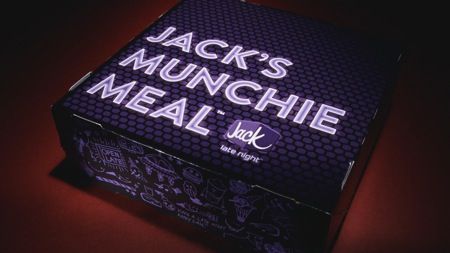
 photo jacks_munchie_meal-closed_box450pi_zps2aa10f38.jpg

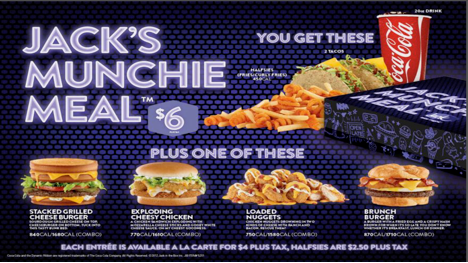
Well now, I see they have the new Jacks Munchie Meals which for only $6 plus tax has enough food to make a very robust meal or satisfy even the most intense midnight craving.

You can choose one of the following styles of Jack’s Munchie Meal™

  • The Stacked Grilled Cheese Burger: Sourdough grilled cheese on top, Cheeseburger on bottom.
  • Loaded Nuggets: Chicken nuggets drowning in two types of cheese with ranch and bacon.
  • Exploding Cheesy Chicken: A chicken sandwich exploding with mozzarella, cheesy sticks, and gooey white cheese sauce.
  • Brunch Burger: A burger with a fried egg and a crispy hash brown for when it’s so late you don’t know whether its breakfast, lunch or dinner.

 photo JacksMunchieMeal_zps550cae9c.png

All of the meals also come with 2 tacos, halfsies (which are half curly fries and half French fries) as well.

Man, the Brunch Burger by far interest me the most, as I love a fried egg on top of a burger.  Though I likely would try all of them at some point if I still ate out at night late. 

So if you are out and about between 9pm and 2am and in the mood for a full meal that will surely make you feel sleepy after consuming it, try Jack’s Munchie Meal™ and see what it tastes like for yourself.

Are you a fan of Jack in the Box?  Like Jack in the Box on Facebook or Follow @JackBox on Twitter and let them know what you think of the new Munchie Meals.

Visit Sponsor's Site